9 Controlled tool use by agents
Suppose a search result reveals that a question needs a second source, but the useful search is unknown until the first result arrives. A fixed workflow can handle known branches, as Chapter 8 showed. An agent lets the model choose the next action from what has been observed. The application checks that choice, runs any permitted tool, records its result, and decides whether to continue. Input schemas, permissions, budgets, and stop checks control different parts of that cycle.
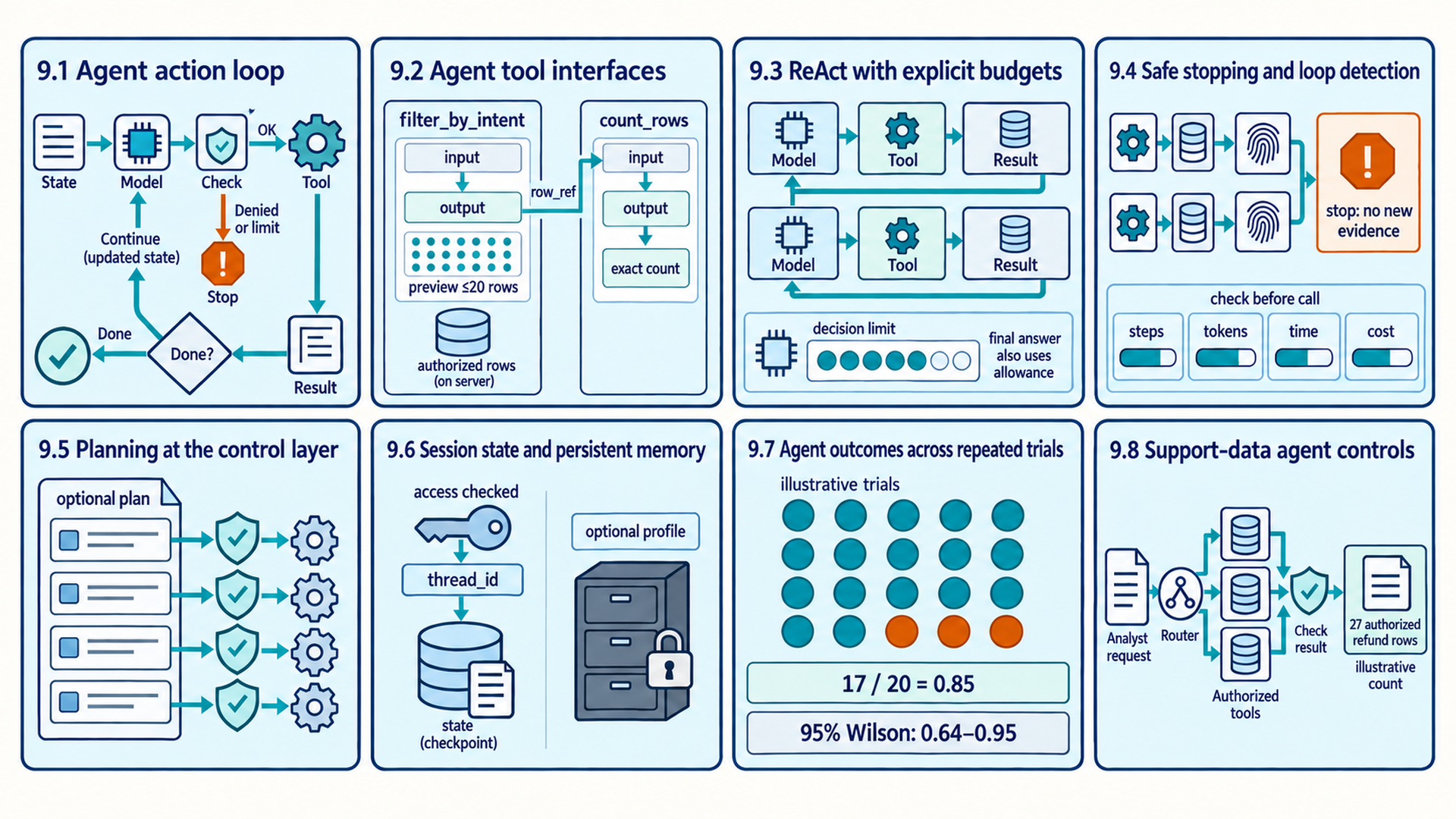
The map follows the sections in reading order. Tool checks, budgets, state, and planning support the action loop rather than forming a fixed sequence of execution stages. Its counts and trial results illustrate the examples below, not measured agent performance.
9.1 Agent action loop
A workflow can contain model calls without giving the model control over the sequence. The defining change in an agent is that a model chooses at least part of the next action after observing the current state. The basic loop is goal, reason or decide, act, observe, and stop or repeat.
- Agent: A system in which a model selects actions toward a goal from observations, tools, and state, while application code enforces authorization, execution, budgets, and stopping rules. Autonomy describes which next-step choices the model controls.
In one cycle, the model requests a search, the application checks the tool name, query, permission, and remaining budget, and the search tool returns evidence or an error. The application records that result and updates the current state. It ends the run when the answer meets the task’s checks or a stop condition applies. Otherwise, the model receives the new state before choosing again. Only a continuation decision starts another cycle. A completed outcome ends the run.
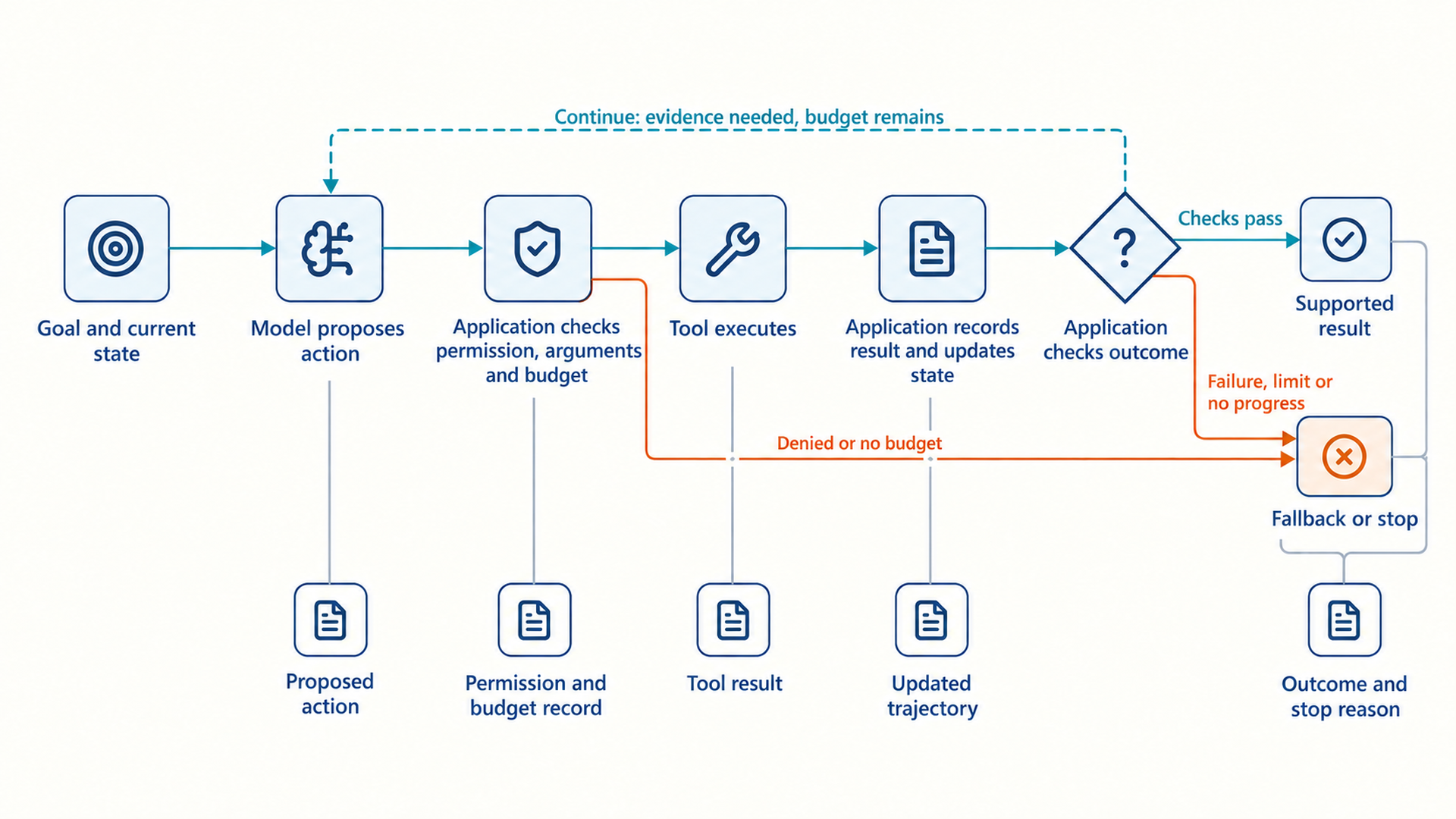
The stop decision belongs to the application’s control loop. Without a success check, iteration cap, or budget, the loop can continue until context or money is exhausted.
The application can reject malformed or unauthorized actions before execution and can stop the loop independently of the model.
Action: A proposed operation, including tool execution, clarification requests, subtask delegation, or terminal responses.
Observation: The environment result returned after an action, such as tool output, error, updated state, or user response.
Trajectory: The ordered record of model decisions, tool calls, observations, and state changes in one trial.
A state machine represents a process by its current state and the allowed transitions to another state. In a controlled agent, the state contains the goal, selected evidence, prior observations, remaining budgets, and relevant policy. The model proposes one action, the application validates and executes it, and a new observation updates the state. A termination function checks whether the goal, fallback, or budget condition has been reached.
The application records the source of each observation and accepts an observation only from the executed tool or environment, not from model-generated text. Each record retains the tool identity, normalized arguments, authorization context, result status, and relevant version. Agent evaluation can then distinguish an incorrect model decision from a tool failure, stale cache, authorization denial, or invalid state transition.
9.2 Agent tool interfaces
An agent chooses its next action from the capabilities that the application makes available. Ambiguous names, overlapping descriptions, or untyped parameters can make tool selection unreliable. A tool specification describes a capability’s purpose, inputs, outputs, errors, side effects, and required permission. The model uses that description to choose a tool, while application code validates the proposed call before execution.
Tool descriptions identify the questions each tool can answer, the meaning and units of its parameters, and the expected result fields. Two nearly identical descriptions leave the model with little basis for choosing between them. Tool-selection tests can compare whether combining or separating those capabilities reduces errors without removing a needed operation.
| Tool definition element | Question it answers | Application check |
|---|---|---|
| Name and purpose | Which capability does this tool provide? | No confusing overlap with another tool |
| Typed arguments | What exact inputs are required? | Schema, ranges, identifiers, units, and defaults |
| Result schema | What does the tool return? | Stable fields, source details, and explicit errors |
| Side effects | What external state can change? | Authorization, approval, idempotency, and audit log |
| Failure behavior | What should happen on timeout or invalid state? | Retry policy, fallback, and user-visible message |
The following Python fragment uses synthetic customer-support requests from the Bitext dataset. Each row contains a request and an intent label such as get_refund. A direct count_by_intent tool could answer a count question in one call. This two-tool example shows one call passing a result reference to the next. The same stored set can supply counts or examples. It costs an extra call and needs temporary server storage. Section 9.8 develops the case.
The fragment uses BaseModel and Field from Pydantic v2 to describe call arguments. The application supplies DATASET, current_user, authorized_rows, result_store, and InvalidToolArgument. Dataset metadata contains the allowed intent names in DATASET.valid_intents and a version in DATASET.version. authorized_rows checks the caller and returns every row that caller may read. The store keeps filtered IDs together with caller, version, and intent, and rejects unknown references, unauthorized callers, or stale versions with typed errors. A wrapper validates arguments into IntentFilter or CountRows, calls the plain function, and converts its expected errors into tool results. No registration decorator is shown.
filter_by_intent returns a limited preview and an opaque reference, an identifier the model passes back without interpreting it, for the complete filtered set. A public call count_rows(rows=row_ref) is converted to CountRows(rows=row_ref) before the function runs. It returns the exact count and version. Unknown intents fail in the filter. A valid intent with no authorized matching rows returns an empty preview and a reference whose count is zero. Neither function changes the dataset, although filtering writes a temporary result record.
Code example: A typed data tool states its scope and returns a controlled observation.
class IntentFilter(BaseModel):
    intent: str = Field(description="Exact Bitext intent name.")
    limit: int = Field(default=20, ge=1, le=100)

class CountRows(BaseModel):
    rows: str = Field(description="Opaque row_ref returned by filter_by_intent.")

def filter_by_intent(args: IntentFilter) -> dict:
    """Return a full-set row reference and at most `limit` preview rows."""
    rows = authorized_rows(DATASET, current_user)
    if args.intent not in DATASET.valid_intents:
        raise InvalidToolArgument("Unknown intent for this dataset version.")

    filtered = [row for row in rows if row["intent"] == args.intent]
    row_ref = result_store.store_filtered_ids(
        row_ids=[row["row_id"] for row in filtered],
        caller_id=current_user.id,
        dataset_version=DATASET.version,
        intent=args.intent,
    )
    return {"row_ref": row_ref, "preview": filtered[:args.limit]}

def count_rows(args: CountRows) -> dict:
    """Return the exact count for an authorized, current filtered reference."""
    result = result_store.load_filtered_ids(
        args.rows, caller_id=current_user.id, dataset_version=DATASET.version
    )
    return {
        "count": len(result.row_ids),
        "dataset_version": result.dataset_version,
        "intent": result.intent,
    }
The wrapper constrains argument form, while authorized_rows and the result store enforce access outside the model. The preview limit restricts the number of rows returned, not their byte or token size. A production wrapper must also cap individual field sizes and the complete response. The limit does not change the complete filtered set behind row_ref. The model passes that reference to count_rows and receives the count, dataset version, and intent without receiving all matching rows.
9.3 ReAct with explicit budgets
The tool specification now defines the actions, argument schemas, and observations that the application can safely execute. One response cannot solve a task whose next step depends on evidence returned by an earlier tool action.
- ReAct: An agent-control pattern that interleaves reasoning, actions, and environment observations so a later decision can use the latest result.1
Classic ReAct writes Thought, Action, and Observation in a text trace. The model emits reasoning and an action expressed in that text format. The application executes the action and appends the actual observation. Modern function calling can instead represent the action as typed data and keep private reasoning internal. Both representations let the next decision use the latest result. Authorization and budgets are additional application controls, not guarantees of ReAct itself.
The model must not fabricate the observation. The application is the only component allowed to place a validated tool result into the trace.
The source notebook’s prompt requests the current leader of a changing model leaderboard. A model may answer from stale training data. Its wikipedia_search tool demonstrates the search-observe cycle, but a Wikipedia summary may omit the current ranking or its date. The adapted loop below must return insufficient evidence unless the result supports the requested fact and its freshness. A production version of this task needs the current leaderboard’s own dated record, not just any returned search text.
This Python fragment keeps the notebook’s text-action format rather than implementing provider-specific function calling. The harness supplies SYSTEM_PROMPT, call_llm, parse_action, parse_final_answer, wikipedia_search, and validate_final_answer. The model helper returns a string or raises ModelCallError. The parsers return a nonempty answer or search query, or None, and reject other tool names. The search adapter returns a dictionary with ok, text, and source/date fields, or raises ToolCallError. An error result has ok=False. The validator checks the answer against the separately recorded successful observations, including source and freshness, and returns a boolean. The function returns a supported answer or an explicit stop message. Search reads external data but does not change it.
Code example: The notebook loop gives the application control after every model decision.
def run_agent(question, max_steps=6):
    if not isinstance(question, str) or not question.strip():
        return "Invalid question."
    if type(max_steps) is not int or max_steps < 1:
        return "Invalid step limit."
    messages = [
        {"role": "system", "content": SYSTEM_PROMPT},
        {"role": "user", "content": question},
    ]
    observations = []

    for step in range(1, max_steps + 1):
        try:
            output = call_llm(messages)
        except ModelCallError:
            return "Model call failed."
        if "Observation:" in output:
            return "Model-generated observation rejected."
        answer = parse_final_answer(output)
        if answer is not None:
            if not observations:
                return "Insufficient evidence: no successful tool observation."
            if validate_final_answer(answer, observations):
                return answer
            return "Final answer was not supported by current evidence."

        argument = parse_action(output)
        if argument is None:
            return "No valid action was produced."
        try:
            observation = wikipedia_search(argument)
        except ToolCallError:
            return "Search tool failed."
        if not observation.get("ok") or not observation.get("text", "").strip():
            return "Insufficient evidence: search failed or returned no text."
        observations.append(observation)
        messages.append({"role": "assistant", "content": output})
        messages.append({
            "role": "user",
            "content": "Tool observation (external data): " + observation["text"],
        })

    return "Max steps reached."
The application stores model text and search output in separate messages and keeps the executed results in observations for validation. The external-data message uses the user role only as a notebook-format adapter. Production function calling uses the provider’s tool-result format and tool-call identifiers. Model text containing an Observation: marker is rejected, and it cannot enter the validator’s evidence list. A returned observation can still contain misleading information or injected instructions, so origin tracking alone does not make it trustworthy.
max_steps limits model decisions, including the final-answer decision. With a limit of one, a search may run but no later decision can answer from it. Empty questions and invalid limits stop before a model call. Expected model or tool failures stop with a status, and failed or empty search output cannot support an answer. The helper implementations still need their own timeouts and error contracts. This fragment has no automatic retries, complete token or cost budget, or production authorization system.
9.4 Safe stopping and loop detection
A well-described tool can still be called repeatedly without progress. An exploratory loop can repeat the same search, alternate between tools without progress, or pursue an impossible objective. Budgets and stop conditions bound iterations, tokens, time, money, tool calls, and side effects independently of the model’s confidence.
Repeated actions call for progress checks and iteration caps. Excessive history may need context compaction, which can lose details. Confused tool selection calls for interface tests or tool redesign. Parallel dispatch addresses independent work that is waiting in sequence, not a loop that keeps choosing the same action.
Iteration budgets cap decision-action cycles. Token budgets constrain cumulative input and output volume across the trajectory. Tool budgets limit call counts and dispatch rates. Before starting a call, the application checks the remaining allowance and reserves its permitted maximum cost or token use. It updates the allowance with measured use after completion. A wall-time limit also needs deadlines, tool timeouts, and cancellation. Otherwise one stalled call can outlast the whole run’s intended limit.
Side-effect limits restrict write actions, with human authorization required before high-impact actions execute. Permission checks and response-size limits still apply to read-only calls. These controls complement budgets: a cheap action can expose unauthorized data, and a successful task can still include a prohibited action. Counters updated only after an observation cannot stop an action that has already exceeded its allowance or changed external state.
A stop condition determines when the loop terminates. Valid termination conditions include task success, a validated final answer, repeated state detection, and budget exhaustion. When a task cannot be completed, the system should return a structured fallback explaining completed observations and unresolved blockers.
Loop detection
Compare normalized recent actions and the state relevant to the next decision. Exclude incidental timestamps but retain source versions and environment changes that affect the next action. An unchanged repeated search with no new evidence can trigger a stop. A retry after a transient failure or updated source is a different case and needs its own retry allowance. Normalization that drops those changes can stop a useful run too early.
Each terminating run ends with a specific outcome. Success requires the task’s outcome and policy checks to pass. A confident message alone does not establish completion. Other terminal states include insufficient evidence, unsupported scope, authorization failure, recoverable tool failure, exhausted budget, and human escalation. Typed outcomes make fallback behavior measurable and prevent a loop from reporting repeated activity as progress.
9.5 Planning at the control layer
The basic loop can choose again after each observation. A visible plan becomes a candidate when tasks have dependencies that must be checked, independent work that may run in parallel, or steps that need inspection before execution. Chapter 10 compares incremental decisions, upfront plans, dependency graphs, and sandboxed code. These are alternatives or extensions, not compulsory steps in every agent. The application stores any selected plan and validates each proposed action as before. Tests must then show whether the extra planning improves task outcomes enough to justify its cost and delay.
9.6 Session state and persistent memory
An agent trajectory stores messages, actions, observations, and graph state for one run. A follow-up or process restart may need that state again, but session recovery does not justify copying the thread into persistent cross-session memory. A workflow checkpoint restores one thread. This is saved execution state, not the saved model version that Chapter 1 called a checkpoint. Chapter 11 covers how selected information may cross sessions through a separate memory lifecycle.
LangGraph is a library for applications that run stateful workflows as graphs. A workflow checkpoint stores graph state for one thread or session under an identifier. InMemorySaver keeps that state only while the process runs. A durable saver backed by SQLite or Postgres can preserve it across process restarts under application control.2
This Python fragment assumes the application compiled graph with a checkpointer and a message-state update rule such as MessagesState or add_messages. That rule appends new messages or updates matching message IDs. Without it, a new messages value replaces the old list. The application imports HumanMessage, which wraps the current user text, and maps the authenticated caller’s conversation to a stable session_id. LangGraph uses thread_id inside configurable to select saved state. Knowing that identifier does not grant permission to read the conversation, so the application must check access before this fragment runs.3
Code example: A thread identifier selects saved state when a checkpointer is configured.
config = {"configurable": {"thread_id": session_id}}
result = graph.invoke(
    {"messages": [HumanMessage(content=user_text)]},
    config=config,
)
With those settings, a later call using the same session_id loads that thread’s saved state and applies the new message. A different identifier selects another thread. graph.invoke returns the updated graph result. Restart recovery also needs the same durable database and compatible graph state. Retention rules may delete older state, and saver or graph failures must be reported rather than presented as a recovered conversation. The fragment does not create or update a separate user profile.
9.7 Agent outcomes across repeated trials
An agent introduces variable trajectories, tool behavior, and environment state beyond one model response. One successful trace cannot establish reliability, and grading one preferred path can reject valid alternative strategies. AgentBench4 demonstrates that results can differ across interactive environments, so one benchmark cannot replace tests of the product’s own tasks and tools. Agent evaluation separates tasks, trials, transcripts, verified final states, graders, reliability, cost, and latency before comparing system versions. The Tau-bench5 study grades final database state across repeated tool-agent-user trials. It is a benchmark with defined domains and simulator assumptions, not a universal release protocol.
For a task that changes records, the grader checks the authoritative final environment state. For a read-only count or summary, it checks the returned answer against the authorized dataset or selected evidence. Policy checks must also inspect actions that were prohibited even if their effects were later reversed. A final message that sounds successful does not establish any of these properties.
For a positive number \(N\) of trials, let \(s_i\) be one when trial \(i\) meets the task’s outcome and policy checks and zero otherwise. The observed task success rate is:
\[ \hat{p}=\frac{\sum_{i=1}^{N}s_i}{N} \tag{9.1}\]
Here, \(N\) is trial count, \(s_i\) is the binary result for trial \(i\), and \(\hat{p}\) is the observed success frequency. Report an uncertainty interval with the estimate. A Wilson score interval estimates a binomial success probability from a success count and trial count. It assumes independent trials with the same success probability. The textbook normal approximation has poor coverage at small sample sizes and can extend below 0 or above 1.6 If tasks or conditions differ, report those groups separately rather than treating their results as identical trials.
Example: Repeated agent reliability
Suppose the same task is reset and run independently 20 times under unchanged conditions, with 17 successful outcomes. These are illustrative results.
1. Sum the binary success indicators: 17. 2. Divide by N = 20: 17 / 20 = 0.85. 3. Inspect the three failures by trajectory and final environment state. Result: Observed task success is 0.85 across these 20 trials.
Interpretation: A 95 percent Wilson interval for 17 of 20 runs from about 0.64 to 0.95, so these observations remain compatible with a 70 percent success probability at this confidence level. The score also does not say whether 0.85 is acceptable, nor whether failures cluster around one tool, slice, or latency condition. Report those alongside the rate.
A product may require several consecutive successful runs. Under the simplifying assumption that trials are independent and each succeeds with probability p, all-trial reliability decreases multiplicatively.
\[ R_m=p^m \tag{9.2}\]
Here, \(R_m\) is the probability that all \(m\) runs succeed, \(m\) is a positive integer, and \(p\) is a single-trial success probability between 0 and 1. The equation multiplies conditional success probabilities under the independence and equal-probability assumptions. An observed rate \(\hat{p}\) is an estimate, not a known \(p\). Shared state or changing conditions can break those assumptions. Tau-bench reports an all-trials measure as pass^k, estimated per task from repeated trials. It differs from pass@k in Section 5.2: pass@k concerns at least one successful attempt, while pass^k concerns success in all k attempts.
Example: Ten consecutive successful trials
Assume an idealized independent per-trial success probability of 0.95 and require ten successful runs.
1. Raise the per-trial probability to the number of required runs: 0.95¹⁰. 2. The resulting probability is approximately 0.599. Result: Even a 95 percent single-trial rate yields only about a 60 percent chance that all ten runs succeed.
Interpretation: All-trial reliability can be much lower than the single-trial rate. Dependence between trials can make the all-success probability higher or lower than this independent model, so release decisions should use measured repeated runs.
Trial cost includes every model and tool step, including failed and retried steps.
\[ C_{trial}=\sum_{t=1}^{T}(r_{in}L_{in,t}+r_{out}L_{out,t}+c_{tool,t}) \tag{9.3}\]
Here, \(C_{trial}\) is the model-and-tool cost of one run, and \(T\) is its number of executed steps. \(L_{in,t}\) and \(L_{out,t}\) are input and output token counts at step \(t\). The rates \(r_{in}\) and \(r_{out}\) are charges per token in the same currency, while \(c_{tool,t}\) is that step’s external-tool charge. Include failed and retried steps. If models or token classes have different prices, use step-specific rates. Across trials, divide total cost, including unsuccessful runs, by the number of successful outcomes. With zero successes, cost per successful task is undefined. Report the total spend and zero successes instead.
Example: Failed steps in agent trial cost
Suppose an unsuccessful search costs $0.004, its successful retry costs $0.006, and the final answer costs $0.010. These charges are illustrative.
1. Add the first two step costs: $0.004 + $0.006 = $0.010. 2. Add the final step: $0.010 + $0.010 = $0.020. Result: The complete trial costs $0.020 before shared infrastructure overhead.
Interpretation: Counting only the successful retry and answer would report $0.016 and miss the failed search’s $0.004. An entirely unsuccessful trial also contributes to total spend when computing cost per successful task.
This Python fragment assumes task supplies an ID, prompt, and outcome-and-policy grader. agent_factory creates a fresh agent for each seed, and fresh_sandbox resets files, data, and caches. A supplied TrialExecutionError carries result, containing the partial transcript, incurred cost, and elapsed time when an agent run fails. The harness still snapshots and grades that run, then continues with fresh state. Sandbox setup, snapshot, or grader errors abort the batch: their results cannot be counted as valid trials until the evaluator is repaired. A positive integer trial count is required. The returned records contain one transcript, outcome, grade, execution-error status, cost, and latency per completed evaluation. Nothing is promoted into a user profile.
Code example: Repeated trials use fresh state and grade the durable outcome.
def run_trials(task, agent_factory, trials=20):
    if type(trials) is not int or trials < 1:
        raise ValueError("trials must be a positive integer")
    records = []
    for seed in range(trials):
        sandbox = fresh_sandbox(task, seed)
        execution_error = None
        try:
            result = agent_factory(seed).run(task.prompt, sandbox)
        except TrialExecutionError as failure:
            result = failure.result
            execution_error = type(failure).__name__
        outcome = sandbox.snapshot()
        grade = task.grader(outcome, result.transcript)
        records.append({
            "task_id": task.id,
            "seed": seed,
            "transcript": result.transcript,
            "outcome": outcome,
            "success": grade.success,
            "execution_error": execution_error,
            "cost": result.cost,
            "latency_ms": result.latency_ms,
        })
    return records
A fresh sandbox separates trials only if all mutable dependencies, including agent state and caches, are reset. Seeds identify trial settings but do not make a remote model reproducible or prove independence. The grader checks the task’s authoritative result and required policy conditions. ToolSandbox7 shows how stateful evaluation can recognize milestones across valid alternative trajectories. Transcripts reveal route, parser, tool, retry, and stop-condition failures and supply evidence for prohibited-action checks. Repeated reset trials let the evaluator estimate variation that one successful run cannot show.
Trajectory details help diagnose failures. Grading them is also necessary when task or policy requirements concern intermediate actions, access, resource use, or an action sequence. Grading an arbitrary preferred path would reject other valid strategies.
Agent evaluation measures both the final result and the cost and behavior of the run:
- Task success: the required answer or environment state and policy checks pass.
- Cost: token consumption, tool execution fees, reviewer compensation, and hosting infrastructure.
- Latency: complete wall time with p50, p95, and timeout rate.
- Reliability: consistency across repeated trials and relevant slices.
- Trajectory quality: tool selection, errors, retries, and policy events for diagnosis.
9.8 Support-data agent controls
A support-data query can request an exact count, examples, or a summary of support requests. Each needs a different result check. The Bitext case from Section 9.2 combines a router, typed dataset tools, graph state, and answer-and-policy validation around the model’s proposed actions. The application records each route, call, observation, and stop reason so failures can be located.
The dataset contains synthetic labeled customer-support requests, not a record of actual customers’ activity. Each row carries request text and an intent label such as get_refund. An exact-label count has a deterministic expected result once the dataset version and authorized rows are fixed. Natural-language routing and summaries still need their own tests and scoring criteria.
The router classifies structured, unstructured, or out-of-scope requests before tool selection. Structured questions use deterministic dataset tools for categories, filtering, counts, examples, and distributions. Unstructured questions use selected rows as evidence for summarization. Out-of-scope questions receive a clear decline with the supported scope and next available route.
Suppose an authorized dataset version contains 27 rows labelled get_refund. This illustrative count is not a measured count of the full Bitext dataset. For How many refund requests are in the dataset?, the example first calls filter_by_intent(intent='get_refund', limit=20). The tool stores the complete filtered IDs and returns {"row_ref": ..., "preview": [...]}. The preview contains at most 20 rows. The next call, count_rows(rows=row_ref), checks the caller and dataset version and returns {"count": 27, "dataset_version": ..., "intent": "get_refund"}. It counts stored IDs rather than preview rows. The model reports the tool’s count instead of computing it. An answer should identify its authorized dataset scope so that 27 is not mistaken for a global count.
A maximum iteration limit returns a fallback if no supported answer is produced. The command-line interface exposes tool calls, results, and stop reasons for debugging without requiring private model reasoning. A durable checkpointer restores session state after restart. A separate profile of selected user facts is an optional feature with its own update and deletion policy in Chapter 11. The source case also exposes tools through FastMCP, a Python library for creating shared tool servers. Sections 10.5–10.6 explain Model Context Protocol (MCP), the server connection, and permissions. Hosting a tool remotely is not required for the action loop itself.
| Component | Input | Output or state | Acceptance evidence |
|---|---|---|---|
| Router node | User question | Supported route label | Golden route set including out-of-scope cases |
| Dataset tools | Typed parameters and authorized data | Authorized rows, counts, or aggregates | Zero-match, access, version, and response-size tests |
| ReAct graph | Route, messages, tool registry | Final answer and trajectory | Max-step fallback and repeated task success |
| Checkpointer | Session ID and graph state | Restored session history | Durable-saver restart and follow-up tests |
| Optional profile store | User ID and validated facts | Curated semantic profile | Correction, persistence, and deletion tests |
Chapter conclusion
The model proposes tool actions through typed schemas. Application code validates and executes them, manages state and budgets, and stops the loop. Repeated trials measure whether the required results and policy checks pass consistently. Chapter 10 extends this control structure with planning, shared tool connections, sandboxed code, and retrieval recovery.
Yao, S., Zhao, J., Yu, D., Du, N., Shafran, I., Narasimhan, K., & Cao, Y. (2022). ReAct: Synergizing reasoning and acting in language models. arXiv. https://arxiv.org/abs/2210.03629. The paper interleaves reasoning traces with environment actions and observations. The chapter adds typed validation, authorization, and explicit budgets as engineering controls.↩︎
LangChain AI. (2026, June 29). LangGraph persistence documentation (commit
3edafc8c). GitHub. https://github.com/langchain-ai/docs/blob/3edafc8c187b52be4e2196cd0955dda4a7592cba/src/oss/langgraph/persistence.mdx. This version documents thread-scoped checkpoints, cross-thread stores, and in-memory and durable savers. It does not test whether persistence improves task quality.↩︎LangChain AI. (n.d.). Graph API overview: Working with messages in graph state. Retrieved September 28, 2026, from https://docs.langchain.com/oss/python/langgraph/graph-api#working-with-messages-in-graph-state. Message reducers govern whether an update appends to or replaces saved messages. This is API behavior, not a guarantee of authorized access or successful recovery.↩︎
Liu, X., Yu, H., Zhang, H., Xu, Y., Lei, X., Lai, H., Gu, Y., Ding, H., Men, K., Yang, K., Zhang, S., Deng, X., Zeng, A., Du, Z., Zhang, C., Shen, S., Zhang, T., Su, Y., Sun, H., . . . Tang, J. (2024). AgentBench: Evaluating LLMs as agents. In International Conference on Learning Representations. https://openreview.net/forum?id=zAdUB0aCTQ. AgentBench evaluates agents in several interactive environments and reports environment-specific performance differences. Its tasks and tool interfaces do not replace evaluation in a particular product environment.↩︎
Yao, S., Shinn, N., Razavi, P., & Narasimhan, K. (2024). Tau-bench: A benchmark for tool-agent-user interaction in real-world domains. arXiv. https://arxiv.org/abs/2406.12045. Tau-bench evaluates final database state across repeated interactions and introduces a consistency measure. Its retail and airline domains and simulator assumptions limit how broadly the results apply.↩︎
Agresti, A., & Coull, B. A. (1998). Approximate is better than “exact” for interval estimation of binomial proportions. The American Statistician, 52(2), 119–126. https://doi.org/10.1080/00031305.1998.10480550. The paper shows that the standard normal-approximation interval has poor coverage for small samples and recommends the Wilson score interval or an adjusted version. It assumes independent trials.↩︎
Lu, J., Holleis, T., Zhang, Y., Aumayer, B., Nan, F., Bai, H., Ma, S., Ma, S., Li, M., Yin, G., Wang, Z., & Pang, R. (2025). ToolSandbox: A stateful, conversational, interactive evaluation benchmark for LLM tool use capabilities. In Findings of the Association for Computational Linguistics: NAACL 2025 (pp. 1160–1183). Association for Computational Linguistics. https://doi.org/10.18653/v1/2025.findings-naacl.65. The benchmark evaluates milestones and state changes across valid alternative paths. It does not prove that final state alone is sufficient for every policy-sensitive task.↩︎